- What you will build
- The table
- Let MySQL do the counting
- Fill in the days with no orders
- Serve it as JSON
- Draw the chart with Chart.js 4
- Skip the endpoint for a single page
- When the chart has to leave the browser
- The whole pattern in one paragraph
Search for how to chart MySQL data with PHP and most of what comes back is years old. One result on the first page still connects with the mysql_* functions that PHP 7 removed. Others pull the data in with jQuery, run on Chart.js 2, and skip the two things that quietly make a real sales chart wrong: days with no orders, and dates that land in the wrong timezone.
This article builds the whole thing properly. You will aggregate the data in MySQL, fill the gaps in PHP, serve it as JSON with PDO, draw it with Chart.js 4, and then reuse the same data to put the chart somewhere JavaScript cannot run, such as an email.
What you will build
A daily revenue and orders chart for the last 30 days, fed by a single PHP endpoint. Revenue is drawn as bars on the left axis and order count as a line on the right axis. Days without a sale still get a slot on the axis. They just sit at zero.
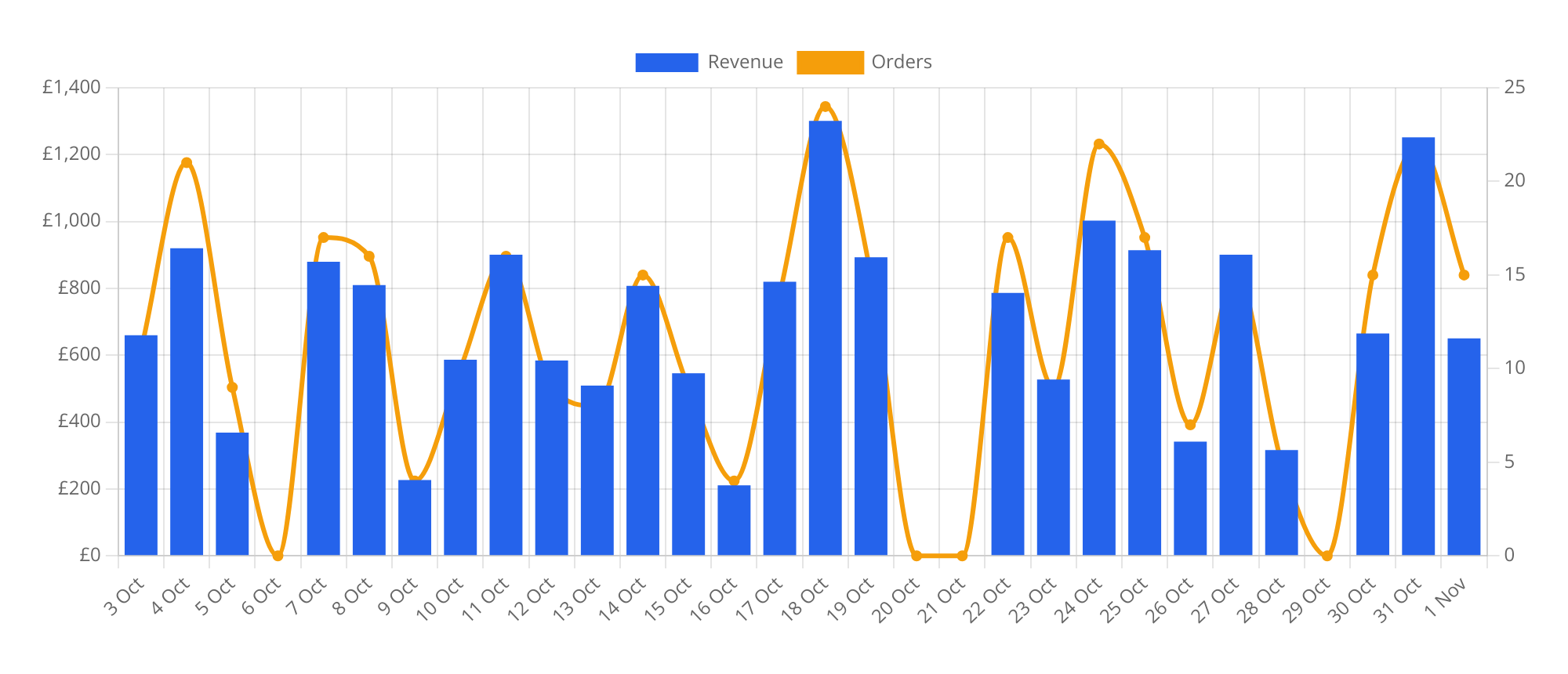
Every snippet below was run against MariaDB 10.11 and PHP 8.3, and the queries are standard MySQL 8 syntax.
The table
The examples use a plain orders table. Money lives in a DECIMAL column, for the reasons covered in storing currency values in MySQL. The timestamp is a DATETIME holding UTC.
CREATE TABLE orders (
    id BIGINT UNSIGNED AUTO_INCREMENT PRIMARY KEY,
    total DECIMAL(10, 2) NOT NULL,
    created_at DATETIME NOT NULL,
    INDEX idx_orders_created_at (created_at)
);
The index on created_at matters more than anything else here, because every chart query filters on a date range.
Let MySQL do the counting
It is tempting to select every row and add them up in a PHP loop. That ships thousands of rows over the wire to produce 30 numbers. Ask the database for the 30 numbers instead:
SELECT DATE(created_at) AS day,
       COUNT(*)         AS orders,
       SUM(total)       AS revenue
  FROM orders
 WHERE created_at >= '2026-10-03 00:00:00'
   AND created_at <  '2026-11-02 00:00:00'
 GROUP BY DATE(created_at)
 ORDER BY day;
Grouping by the expression DATE(created_at) and selecting that same expression keeps the query valid under ONLY_FULL_GROUP_BY, which MySQL 8 turns on by default. If grouping by expressions is new to you, MySQL GROUP BY explained walks through it.
Look closely at the WHERE clause. It compares the raw column against a half-open range, from midnight on the first day up to (but not including) midnight after the last. It would be tempting to write WHERE DATE(created_at) >= '2026-10-03', and it returns the same rows, but wrapping the column in a function stops MySQL using the index for the range. On the test data, EXPLAIN showed the range version reading 79 rows through idx_orders_created_at for a seven day window, while the DATE() version scanned the whole index. On a table with millions of orders that is the difference between milliseconds and a slow page. Keep the column bare. There is more on how MySQL picks indexes in our introduction to database indexes.
Fill in the days with no orders
GROUP BY only returns groups that exist. If nobody bought anything on 20 and 21 October, those dates are simply missing from the result, and Chart.js will happily draw 19 October next to 22 October as if they were consecutive. The chart looks fine and tells a lie.
You can fix this in SQL by joining against a calendar table, which we covered in querying against dates with a dates table. For a chart endpoint it is often simpler to fill the gaps in PHP, because you are already looping over the rows:
<?php

declare(strict_types=1);

/**
 * Orders and revenue per day for the last $days days, oldest first,
 * with a zero row for every day that had no orders.
 */
function daily_sales(PDO $pdo, int $days): array
{
    $to = new DateTimeImmutable('tomorrow');   // midnight at the end of today
    $from = $to->modify("-{$days} days");

    $stmt = $pdo->prepare(
        'SELECT DATE(created_at) AS day, COUNT(*) AS orders, SUM(total) AS revenue
           FROM orders
          WHERE created_at >= :from AND created_at < :to
          GROUP BY DATE(created_at)
          ORDER BY day'
    );
    $stmt->execute([
        'from' => $from->format('Y-m-d H:i:s'),
        'to' => $to->format('Y-m-d H:i:s'),
    ]);

    $found = [];
    foreach ($stmt as $row) {
        $found[$row['day']] = $row;
    }

    $series = [];
    foreach (new DatePeriod($from, new DateInterval('P1D'), $to) as $date) {
        $day = $date->format('Y-m-d');
        $series[] = [
            'date' => $day,
            'label' => $date->format('j M'),
            'orders' => (int) ($found[$day]['orders'] ?? 0),
            'revenue' => round((float) ($found[$day]['revenue'] ?? 0), 2),
        ];
    }

    return $series;
}
DatePeriod excludes its end date, so a range from 30 days before tomorrow up to tomorrow yields exactly 30 days, today included. Each one either picks up its row from $found or gets zeros.
The casts matter. PDO returns SUM() over a DECIMAL column as a string, so without (float) your JSON carries "509.85" in quotes, and anything in JavaScript that adds two of those together concatenates them instead. Casting to a float is fine for display. Keep the exact DECIMAL strings for anything that touches invoices.
Decide which timezone a "day" means, too. DATE(created_at) on a UTC column gives you UTC days, while new DateTimeImmutable('tomorrow') uses PHP's default timezone. Run PHP in UTC and the two agree. If the business runs on UK time, though, an order placed at 12:30am in July is stored as 11:30pm the previous day and lands on the previous day's bar. When that matters, group by CONVERT_TZ() and set PHP to the same zone. The trade-offs are covered in storing timezone-aware dates in MySQL.
Serve it as JSON
The connection lives next to daily_sales() in src/sales.php. Credentials come from environment variables (see using .env variables in PHP), and PDO throws exceptions so a broken query fails loudly:
<?php

declare(strict_types=1);

function db(): PDO
{
    return new PDO(
        sprintf('mysql:host=%s;dbname=%s;charset=utf8mb4', getenv('DB_HOST'), getenv('DB_NAME')),
        getenv('DB_USER'),
        getenv('DB_PASS'),
        [
            PDO::ATTR_ERRMODE => PDO::ERRMODE_EXCEPTION,
            PDO::ATTR_DEFAULT_FETCH_MODE => PDO::FETCH_ASSOC,
        ],
    );
}
The endpoint, sales-data.php, accepts an optional days parameter:
<?php

declare(strict_types=1);

require __DIR__ . '/../src/sales.php';

$days = filter_input(INPUT_GET, 'days', FILTER_VALIDATE_INT, [
    'options' => ['default' => 30, 'min_range' => 7, 'max_range' => 365],
]);

header('Content-Type: application/json');
header('Cache-Control: private, max-age=300');

echo json_encode(daily_sales(db(), $days), JSON_THROW_ON_ERROR);
filter_input() does the validation in one call. A missing value, ?days=abc, ?days=9999 and ?days=1 OR 1=1 all came back as 30 in testing, and the query never sees user input as SQL anyway because the dates go in as bound parameters. That is the same principle behind preventing SQL injection in PHP.
The Cache-Control header lets the browser reuse the response for five minutes, which is plenty for a sales chart. If you want to go further, our guide to HTTP caching headers covers ETags and 304s.
A request to /sales-data.php?days=7 returns an array like this, trimmed to three days:
[
  {"date": "2026-10-28", "label": "28 Oct", "orders": 5, "revenue": 316.17},
  {"date": "2026-10-29", "label": "29 Oct", "orders": 0, "revenue": 0},
  {"date": "2026-10-30", "label": "30 Oct", "orders": 15, "revenue": 664.82}
]
Draw the chart with Chart.js 4
On the page, give the canvas a wrapper with a fixed height, load Chart.js 4 from a CDN and fetch the data:
<div style="position: relative; height: 360px;">
  <canvas id="sales-chart"></canvas>
</div>

<script src="https://cdn.jsdelivr.net/npm/[email protected]/dist/chart.umd.min.js"></script>
<script>
  const money = new Intl.NumberFormat('en-GB', { style: 'currency', currency: 'GBP' });
  const wholePounds = new Intl.NumberFormat('en-GB', { style: 'currency', currency: 'GBP', maximumFractionDigits: 0 });

  async function drawSalesChart(canvas, days = 30) {
    const response = await fetch(`/sales-data.php?days=${days}`);
    if (!response.ok) {
      throw new Error(`Sales data request failed with ${response.status}`);
    }
    const series = await response.json();

    return new Chart(canvas, {
      data: {
        labels: series.map((day) => day.label),
        datasets: [
          {
            type: 'bar',
            label: 'Revenue',
            data: series.map((day) => day.revenue),
            backgroundColor: '#2563eb',
            yAxisID: 'revenue',
          },
          {
            type: 'line',
            label: 'Orders',
            data: series.map((day) => day.orders),
            borderColor: '#f59e0b',
            backgroundColor: '#f59e0b',
            cubicInterpolationMode: 'monotone',
            yAxisID: 'orders',
          },
        ],
      },
      options: {
        maintainAspectRatio: false,
        interaction: { mode: 'index', intersect: false },
        scales: {
          revenue: {
            position: 'left',
            beginAtZero: true,
            ticks: { callback: (value) => wholePounds.format(value) },
          },
          orders: {
            position: 'right',
            beginAtZero: true,
            grid: { drawOnChartArea: false },
          },
        },
        plugins: {
          tooltip: {
            callbacks: {
              label: (item) => item.dataset.yAxisID === 'revenue'
                ? `Revenue: ${money.format(item.parsed.y)}`
                : `Orders: ${item.parsed.y}`,
            },
          },
        },
      },
    });
  }

  drawSalesChart(document.getElementById('sales-chart'));
</script>
A few of those options are doing more than they appear to.
Setting type on each dataset rather than on the chart is how Chart.js mixes bars and lines in one chart. Each dataset then names its axis with yAxisID, and the scales object defines both axes by those ids. drawOnChartArea: false on the right axis stops it drawing a second set of grid lines across the bars.
maintainAspectRatio: false tells Chart.js to fill the wrapper's height. A responsive chart sizes itself from its parent, so that parent needs its own height and position: relative. Leave them off and the chart comes out the wrong size, or grows each time the window resizes.
cubicInterpolationMode: 'monotone' gives a smooth line that never overshoots its points. The first version of this chart used tension: 0.3 instead, and the orange line dipped below zero on either side of the empty days, which looks like negative orders. Monotone interpolation fixes that.
interaction: { mode: 'index' } shows revenue and orders for a day in one tooltip, wherever you hover in that column. New to async and await? The differences between async and await explains what the fetch call is doing.
Changing the date range
Add a 7, 30 and 90 day picker and the second click throws this error: Canvas is already in use. Chart with ID '0' must be destroyed before the canvas with ID '' can be reused. Chart.js will not draw a second chart on a canvas that still holds one, so keep a reference and destroy the old chart first. Replace the single drawSalesChart() call at the bottom of the script with this:
const canvas = document.getElementById('sales-chart');
let salesChart;

async function showRange(days) {
  salesChart?.destroy();
  salesChart = await drawSalesChart(canvas, days);
}

document.querySelector('#range').addEventListener('change', (event) => showRange(event.target.value));
showRange(30);
Skip the endpoint for a single page
If the chart only appears on one server-rendered page, you do not need a separate JSON endpoint. Print the data straight into the page:
<?php $series = daily_sales(db(), 30); ?>

<script>
  const series = <?= json_encode($series, JSON_HEX_TAG | JSON_HEX_AMP | JSON_THROW_ON_ERROR) ?>;
</script>
The JSON_HEX_TAG flag is the important one. It encodes < and > as \u003C and \u003E, so a label containing </script> cannot end your script block early and start a new one. A product name in a chart label is exactly the sort of user-controlled string that turns into cross-site scripting when it is echoed without care.
When the chart has to leave the browser
Everything so far assumes a browser is drawing the chart. Plenty of places that need a sales chart have no browser at all. Email clients do not run JavaScript, so a Monday revenue report cannot contain a Chart.js canvas. Dompdf does not run it either, and neither does a Slack message.
The usual answer is to run headless Chrome on the server and screenshot the page. That works. Our article on rendering charts as images on the server compares the ways of doing it. It also means running and babysitting a browser for what is, in the end, seven bars.
Because daily_sales() already returns clean, gap-free rows, there is a lighter option: turn the same array into a chart URL. A chart URL service such as RenderChart returns a PNG for a URL describing the chart, so the email just contains an <img> tag:
<?php

declare(strict_types=1);

require __DIR__ . '/src/sales.php';
require __DIR__ . '/src/renderchart.php'; // renderchart_sign() from the RenderChart signing docs

$series = daily_sales(db(), 7);

$url = 'https://c.renderchart.com/?' . http_build_query([
    'key' => getenv('RENDERCHART_KEY'),
    'type' => 'bar',
    'x' => implode(',', array_column($series, 'label')),
    'y' => implode(',', array_column($series, 'revenue')),
    'title' => 'Revenue, last 7 days (£)',
    'values' => 1,
    'w' => 600,
    'h' => 320,
]);

$chartUrl = renderchart_sign($url, getenv('RENDERCHART_SECRET'));

$total = number_format(array_sum(array_column($series, 'revenue')), 2);

$chartHtml = sprintf(
    '<img src="%s" width="600" height="320" alt="%s" style="display:block;width:100%%;max-width:600px;height:auto;">',
    htmlspecialchars($chartUrl),
    htmlspecialchars("Revenue for the last 7 days: £{$total}"),
);
array_column() pulls the labels and revenue out of the rows you already built, http_build_query() handles the encoding, and renderchart_sign(), two short functions copied from the RenderChart signing guide, adds an HMAC signature so nobody can edit the figures in the URL. The secret stays on your server and never appears in the email. With the test data, that URL draws this:
See the zero on 29 October? That is the gap filling paying off a second time.
Only the first request for a chart URL renders an image. Every later open is served from cache and does not count, so a report sent to 500 people costs one render, not 500. RenderChart's free plan covers 50 renders a month with a small watermark, and signed URLs on the paid plans, from $29 a month, render without it. Drop $chartHtml into your mail body with the usual HTML and plain text parts (our guide to sending HTML email in PHP with a plaintext fallback has the boilerplate). The explicit width and the alt text carrying the headline number matter for the same reasons covered in why HTML emails break in Outlook.
The same <img> works in a PDF. If you generate PDFs with dompdf, RenderChart has a walkthrough on adding a chart to a dompdf PDF.
The whole pattern in one paragraph
Aggregate in SQL with a half-open date range so the index gets used. Fill missing days before the data reaches the chart, and cast DECIMAL strings to numbers. Serve the rows from one small PDO endpoint with validated input, and draw them with Chart.js 4 using per-dataset types, two named axes and monotone lines. When the chart needs to appear in an email or a PDF, reuse the same daily_sales() array and build an image URL from it.
Interested in proving your knowledge of this topic? Take the PHP Fundamentals certification.
PHP Fundamentals
Covering the required knowledge to create and build web applications in PHP.
$99

Related articles